
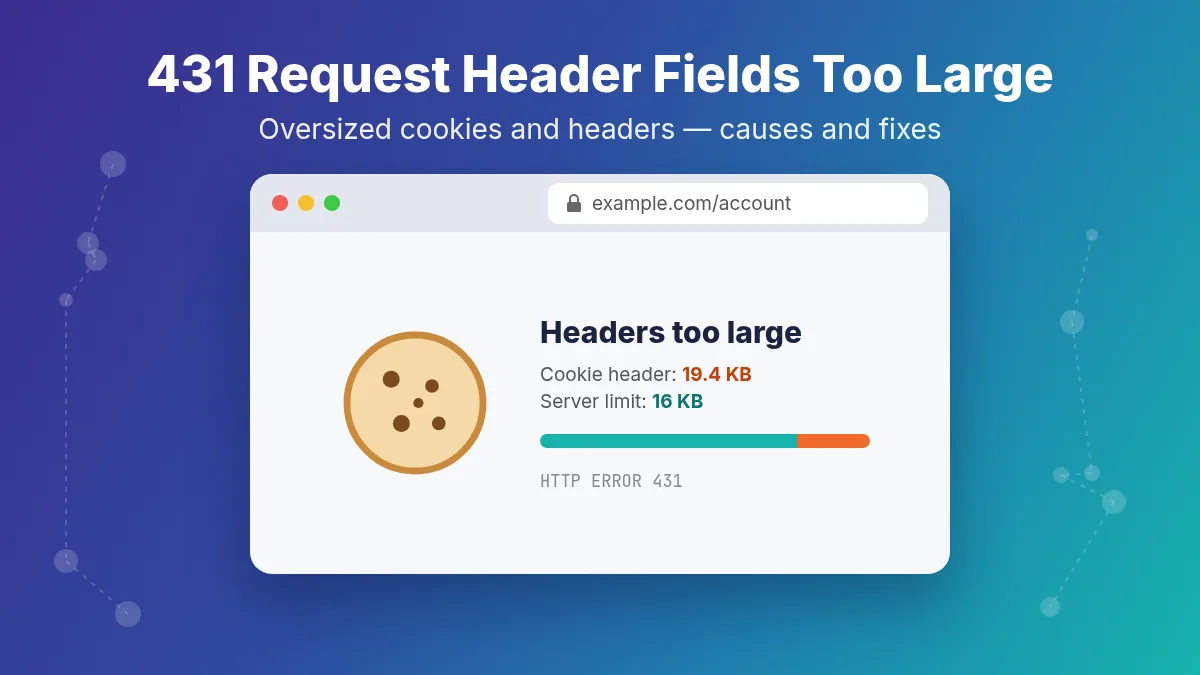
431 Request Header Fields Too Large means the server refused the request because the HTTP request headers were too large. In real cases, this usually comes from oversized cookies, a bloated Referer, too many custom headers, or header limits that are too strict on the server or proxy.
This is not usually a mystery error. Most 431 problems come from one of three things: cookie buildup, bad app behavior that keeps adding header data, or infrastructure limits that are smaller than the request pattern your site actually needs. Visitors can usually fix it in a minute by clearing the cookies of one site. Site owners need to find which header grew, stop it from growing, and only then adjust limits in Node.js, NGINX, Apache, or the proxy in front of them.
Quick Fix
If You Are a Visitor
- Open the site in a private or incognito window.
- Clear cookies for the affected site first, especially if login is involved.
- Reload the page without tracking-heavy query strings.
- Disable VPN, proxy, or browser extensions that modify headers.
- If the error keeps coming back after you clear cookies, tell the site owner which page fails and when.
If You Own the Site or App
- Inspect the
Cookieheader size in browser dev tools. - Check whether one header is too large or the total header set is too large.
- Find out which layer answered: a bare
HTTP ERROR 431page usually comes from a Node.js server, while NGINX and Apache usually answer400for the same problem. - If you use Node.js (Express, Next.js, Vite, and similar), review
--max-http-header-size. - If you use NGINX, review
client_header_buffer_sizeandlarge_client_header_buffers. - If you use Apache, review
LimitRequestFieldSize. - Reduce oversized cookies instead of only raising server limits.
- Retest with a clean session after every change.
What Is 431 Request Header Fields Too Large?
431 Request Header Fields Too Large is an HTTP status code defined in RFC 6585. It means the server is unwilling to process the request because the request header fields are too large. The request may be resubmitted after reducing the size of the headers. The standard also says 431 can be used when the entire set of headers is too large or when one single header field is the problem.
That detail matters. Sometimes the whole request is oversized because many small headers add up. In other cases, one header such as Cookie is already enough to break the request by itself. MDN’s example for 431 uses an oversized Cookie header, which reflects what happens in many real-world browser cases.
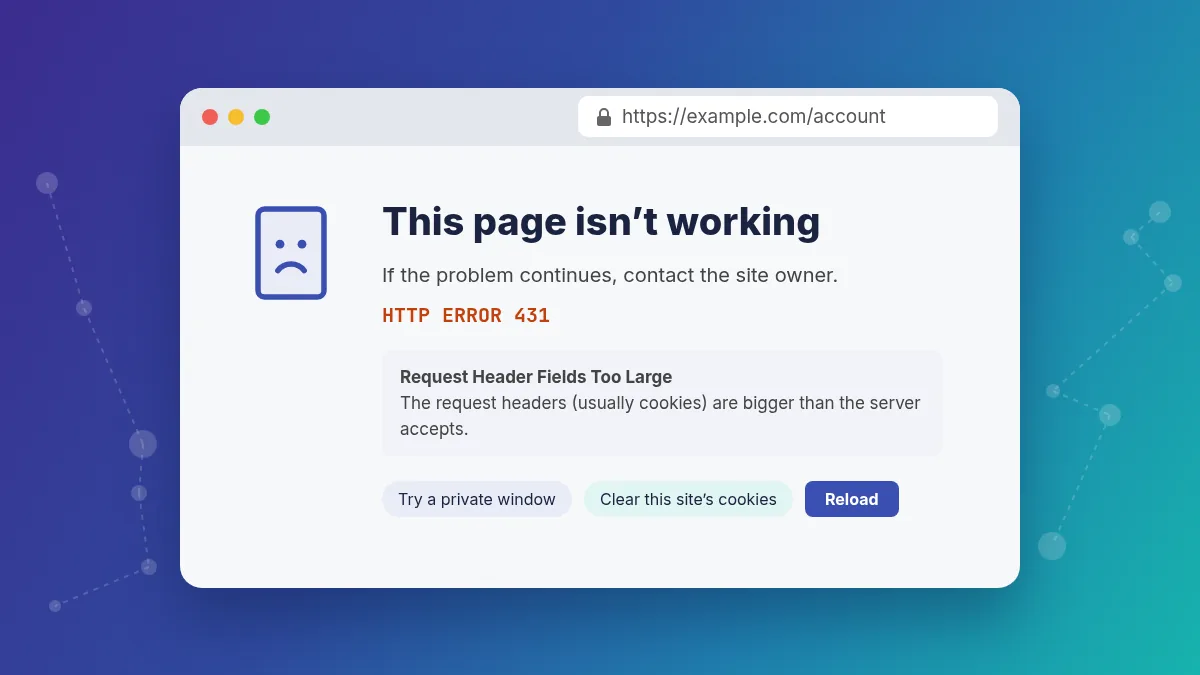
In Chrome and Edge, a 431 response without its own error page usually looks like this:
This page isn't working
If the problem continues, contact the site owner.
HTTP ERROR 431
Other servers return a short HTML page with the title 431 Request Header Fields Too Large. APIs often return the bare status, which shows up as status: 431 in a fetch() error, in the Network tab, or in a client library log.
431 usually appears in situations like these:
- you cannot log in to one site anymore,
- a site works in incognito but not in your normal browser,
- a WordPress admin area breaks after plugin changes,
- a local development server on
localhostsuddenly returnsHTTP ERROR 431, - an API call fails only when many headers are present,
- a proxy or CDN rejects a request before the app sees it.
For visitors, 431 often feels random. For site owners, it is usually very specific. A request is reaching the server with header data that is bigger than the accepted limit.
Which Servers Return 431 (and Which Return 400 Instead)
Not every server uses 431 for this problem. Many web servers were written before RFC 6585 and still answer 400 Bad Request when headers are too large. Knowing which layer produced the error tells you where to change things.
| Layer | Default limit (per its documentation) | What the client sees |
|---|---|---|
Node.js http (Express, Next.js, Vite, many dev servers) | 16 KiB for all headers together (--max-http-header-size) | 431, often with an empty body (Chrome shows HTTP ERROR 431) |
| ASP.NET Core Kestrel | 32 KB total (MaxRequestHeadersTotalSize) | 431 |
| NGINX | Header line must fit one buffer of large_client_header_buffers (default 4 8k) | 400 Request Header Or Cookie Too Large |
| Apache httpd | 8190 bytes per field (LimitRequestFieldSize), 100 fields (LimitRequestFields) | Usually 400 with “Size of a request header field exceeds server limit”; some hosting setups show 431 |
| Cloudflare | 128 KB of request headers in total | A Cloudflare-generated error; a 431 that passes through Cloudflare normally comes from your origin |
If you see 400 Request Header Or Cookie Too Large, the cause and the fix are the same as for 431; our 400 Bad Request guide covers the other reasons for a 400. Limits change between versions, so check the documentation of the version you actually run.
Why 431 Request Header Fields Too Large Happens
Most cases trace back to a small number of causes.
1. Cookies Became Too Large
This is the most common cause by far. Every cookie for a domain gets sent back with requests to that domain. If the browser stores too many cookies, or a few cookies become very large, the Cookie header can exceed what the server accepts. MDN explicitly uses this as its main example for 431. NGINX documentation also notes that long cookies are a typical reason a request may not fit into the normal request-header buffer.
This often happens when:
- login systems set many cookies,
- session cookies store too much data,
- analytics or personalization tools add multiple cookies,
- an app keeps creating new cookies instead of replacing old ones,
- cookies set for the parent domain (for example
.example.com) are sent to every subdomain, so the blog, shop, and app add up on each request.
2. One Header Field Is Too Large
RFC 6585 says 431 can be returned when one header field is too large. That may be Cookie, but it can also be Referer, Authorization, or a custom application header.
Examples:
- a very long bearer token in
Authorization, - a huge
RefererURL full of tracking parameters, - large custom headers added by frontend code or an API client,
- proxy or auth products injecting long identity headers.
A very long URL can also fill the request line itself. In that case servers usually answer 414 Request-URI Too Long rather than 431.
3. The Total Header Set Is Too Large
Sometimes no single header looks extreme, but the total request still becomes too big. That is also explicitly covered by the 431 definition in RFC 6585.
This becomes more likely when requests include:
- many cookies,
- multiple forwarding headers,
- client hints,
- custom auth headers,
- app-level tracing headers.
4. Localhost Cookies From Other Projects
This one surprises many developers. Cookies are not isolated by port, so every app you ever ran on localhost (port 3000, 5173, 8080, and so on) shares one cookie jar. After months of testing logins, analytics, and auth flows locally, the browser sends all of those cookies to your new project. Node.js based dev servers reject the request with 431 once the headers pass their 16 KiB default.
Typical signs: the app works in a private window, works on 127.0.0.1 instead of localhost, or works in another browser.
5. Node.js, NGINX, or Apache Header Limits Are Too Small
Some requests are genuinely too large because of app behavior. Other times the request is not ideal, but the infrastructure limit is the immediate reason it fails.
Node.js limits the total size of request headers to 16 KiB by default; the documentation for --max-http-header-size notes that the default was raised from 8 KiB to 16 KiB in v13.13.0. NGINX uses client_header_buffer_size and large_client_header_buffers for reading request headers. Its documentation says the default header buffer is 1K and that large buffers are used when a request line or header field does not fit. Apache exposes similar control with LimitRequestFieldSize, which sets the maximum allowed size of an HTTP request header field.
6. WordPress or Web App Logic Is Creating Header Bloat
WordPress sites and modern apps often trigger 431 because of the way they use cookies and auth flows.
Common patterns include:
- security plugins that set extra cookies,
- cookie consent banners that store consent details for many services,
- single sign-on systems that add multiple tokens,
- A/B testing or personalization tools,
- cart, checkout, and membership plugins that keep extra session cookies,
- apps that split session state across several cookies.
On WordPress this often shows up first in the admin area or in REST API calls from the block editor. If the editor reports a failed request, compare it with our WordPress REST API error guide.
7. Proxies, CDNs, or API Gateways Add More Header Data
The browser is not always the only source of big headers. Reverse proxies and gateways can add forwarding, auth, or identity headers before the origin sees the request.
This is common with:
- SSO products,
- enterprise proxies,
- identity-aware proxies,
- API gateways,
- service meshes.
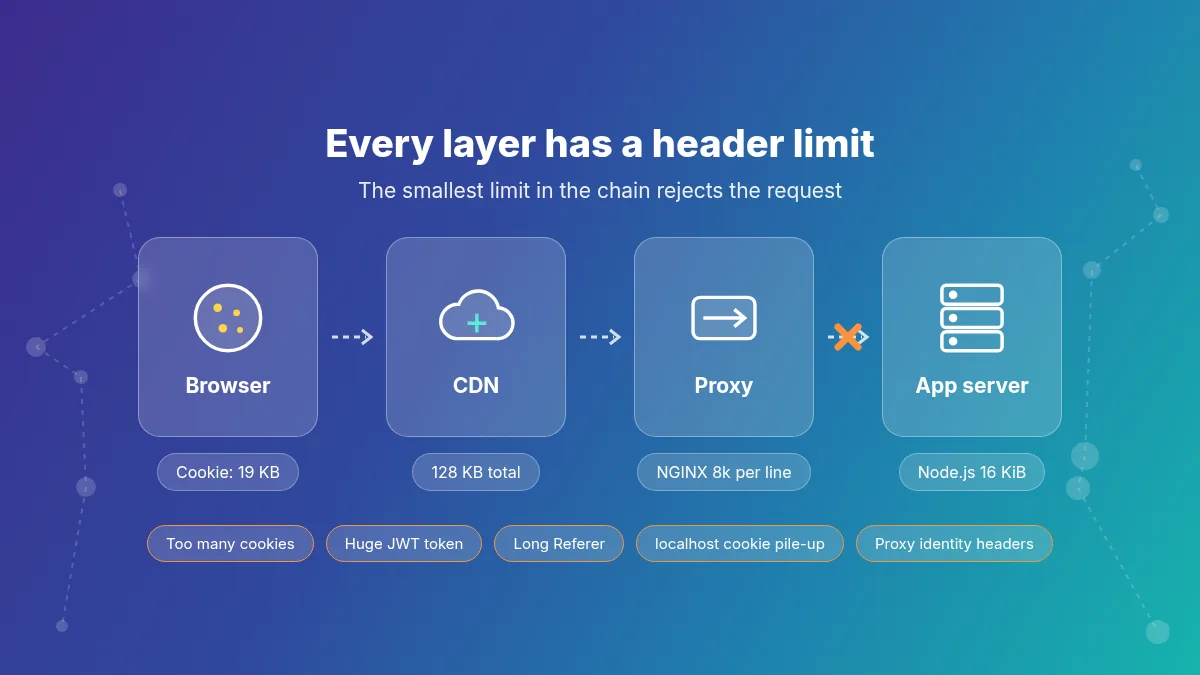
Each layer also has its own limit. Cloudflare allows 128 KB of request headers in total (its changelog says the limit was raised from 32 KB total and 16 KB per header in October 2025). AWS documents fixed header limits for its Application Load Balancer that cannot be raised. The smallest limit in the chain is the one that fails.
8. The Browser Session Is Simply Old and Bloated
Some 431 errors are easy to fix because the site itself is mostly fine. The browser just accumulated too much cookie state over time. That is why university IT pages and support docs often tell users to open the site in incognito or clear cookies for the affected domain first.
How to Fix 431 Request Header Fields Too Large as a Visitor
The fastest fix path is to determine whether this is mainly a browser-session problem or a server/application problem. These steps cover the browser side.
1. Test the Site in a Private or Incognito Window
This is the best first step for visitors. A private window starts with a much cleaner cookie state.
- If the site works there, cookies are the top suspect.
- If it still fails, the issue may be deeper: server limits, proxies, or app behavior.
This test is quick and often saves time immediately. University support pages for 431 explicitly recommend incognito/private browsing as a diagnostic shortcut.
2. Clear Cookies for the Affected Site
If incognito works, clear cookies for that site or domain. In many real 431 cases, this is the direct fix. Several support pages for 431 recommend clearing site-specific cookies because oversized cookie headers are a common cause.
Clearing all browser data is usually unnecessary. Start with site-specific cookies first:
- Chrome: open
chrome://settings/content/all, search for the domain, and click the trash icon next to it. This removes cookies for the site and its subdomains. - Edge: open Settings, search for “cookies”, choose See all cookies and site data, search for the domain, and delete it.
- Firefox: open the site, click the padlock in the address bar, and choose Clear cookies and site data.
- Safari: open Settings, then Privacy, then Manage Website Data, search for the domain, and click Remove.
Menu names move between browser versions, so if a path does not match exactly, look for “site data” or “cookies” in the browser settings search. Then close the tab, open the site again, and log in.
Do this when:
- the error affects one site only,
- the site recently changed login or SSO behavior,
- the problem appears after many sessions over time.
3. Check Whether the Error Affects One Site or Many
This separates local session problems from wider configuration issues.
- If only one site fails, focus on that domain’s cookies and configuration.
- If many secure sites fail, look for a proxy, browser extension, or enterprise software injecting headers.
- If only one app or API client fails, inspect that client’s custom headers.
If one site fails only in one browser, our guide to a website not loading in one browser only walks through extensions, profiles, and saved site data.
4. Remove Long Query Strings and Disable Header-Changing Tools
Open the page from a clean URL without long tracking parameters, so the Referer sent with the next requests stays short. Turn off VPN apps, proxy settings, and extensions that rewrite headers (privacy tools, header editors, user-agent switchers), then reload. If the error disappears, re-enable them one by one.
How to Fix 431 Request Header Fields Too Large as a Site Owner
If many users report the error, clearing one browser does not fix anything. Find the header that grew, find the layer that rejects it, and fix the cause before you touch limits.
5. Inspect the Request Headers in Browser Dev Tools
If you own the site, inspect the real request before changing server limits. In Chrome or Edge, open DevTools, go to Network, reload, click the failing request, and open the Headers tab. Turn on the raw view of the request headers to see their real size. The Application tab (Storage in Firefox) lists every cookie with its size, so you can sort by size and see which ones are huge.
Look for:
- a huge
Cookieheader, - a very long
Referer, - duplicated auth headers,
- custom app headers that keep growing,
- identity or tracing headers added by proxies.
This step often reveals the real cause faster than log reading alone.
6. Reproduce the Error With curl and Find the Layer That Rejects It
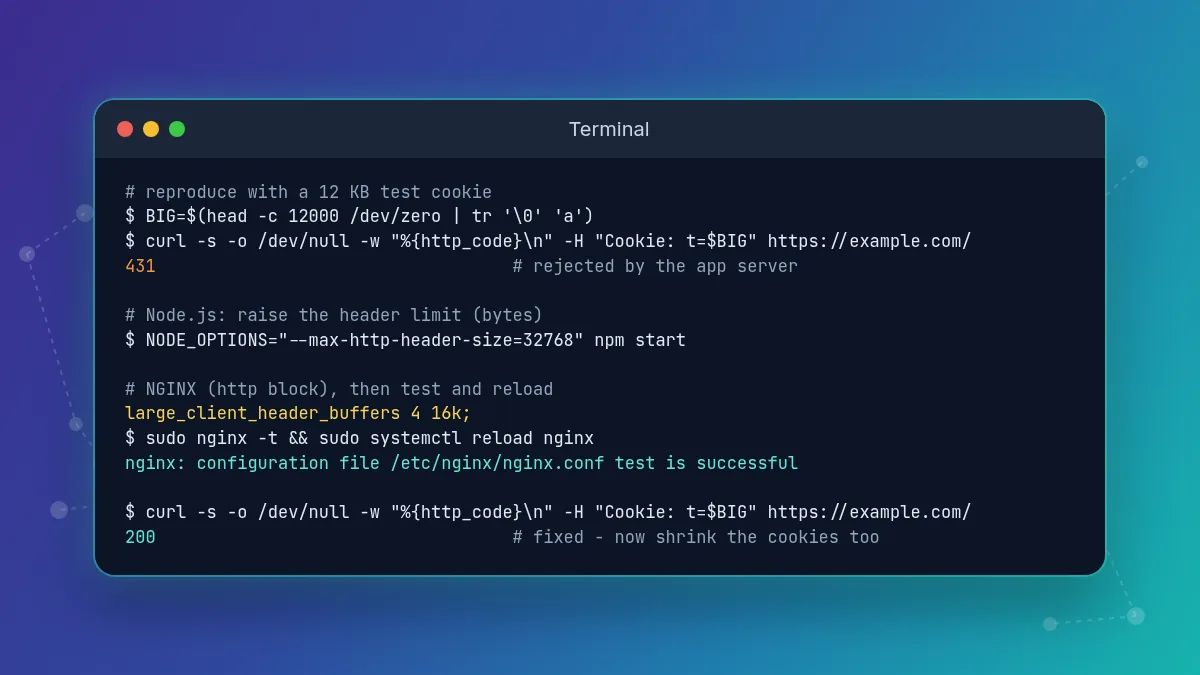
curl removes the browser from the equation. Send the same request with a deliberately large cookie and watch the status code. Then repeat against the origin directly (for example via a hosts entry or the server IP with the right Host header) to see whether the CDN, the proxy, or the app rejects it.
# 12 KB test cookie
BIG=$(head -c 12000 /dev/zero | tr '\0' 'a')
curl -s -o /dev/null -w "%{http_code}\n" -H "Cookie: test=$BIG" https://example.com/

# compare with a normal request
curl -s -o /dev/null -w "%{http_code}\n" https://example.com/

# show who answered (look at Server, CF-Ray, Via)
curl -sI -H "Cookie: test=$BIG" https://example.com/ | head -n 12
A bare 431 with no body points to Node.js or a similar app server. Server: nginx with a 400 page points to NGINX. A CF-Ray header only proves the response passed through Cloudflare; read the error page to see who generated it.
7. Reduce Cookie Size at the Application Level
If cookies are the issue, shrinking them is usually better than only increasing infrastructure limits.
Fixes include:
- storing less session data in cookies,
- removing duplicate cookies,
- shortening cookie payloads,
- reducing the number of cookies set on each request,
- scoping cookies to the host or path that needs them instead of the whole parent domain,
- moving large state server-side instead of storing it in the browser.
This is the most durable fix for recurring 431 errors. RFC 6265 only asks browsers to support at least 4096 bytes per cookie, so one cookie near that size is already a warning sign.
8. Review Login, SSO, and Auth Flows
Authentication systems are frequent 431 triggers.
Check for:
- multiple session cookies from old login flows,
- SSO products setting many auth tokens,
- identity headers added by proxies,
- OAuth or SAML flows leaving behind too much browser state.
If 431 happens mostly on login pages, auth is one of the first areas to audit. Large JWTs in Authorization headers are a common case: keep claims short and look up the rest on the server. If the login keeps bouncing back instead of failing, see WordPress login redirect loop and 401 Unauthorized.
9. Fix 431 on Node.js and Local Dev Servers
If the error comes from Node.js, first clear the cookies for localhost in the browser (DevTools, then Application, then Cookies, then http://localhost:PORT, then Clear all). If that fixes it, the problem was cookie buildup from other local projects. Using a different local hostname per project also keeps cookie jars apart.
If the app legitimately needs bigger headers, raise the limit. The flag and the server option both take a value in bytes:
# one-off, for any Node.js based server
node --max-http-header-size=32768 server.js

# via environment variable (works for npm scripts, Next.js, Vite)
NODE_OPTIONS="--max-http-header-size=32768" npm run dev

// per server, in code
const http = require('node:http');
const server = http.createServer({ maxHeaderSize: 32768 }, app);
A proxy in front of Node.js (NGINX, a load balancer, or a CDN) still applies its own limit, so align them.
10. Check NGINX Header Buffer Settings
If you use NGINX, review the two key directives first:
client_header_buffer_sizelarge_client_header_buffers
NGINX documentation says the normal header buffer is 1K by default, and that larger buffers are allocated when request lines or header fields do not fit. large_client_header_buffers defaults to 4 8k. When a single header field is bigger than one of those buffers, NGINX returns 400 Bad Request with the text “Request Header Or Cookie Too Large” rather than 431, and a request line that is too long gets 414. This makes NGINX a very common place where 431-like header-size problems surface.
Example configuration pattern:
http {
    client_header_buffer_size 4k;
    large_client_header_buffers 4 16k;
}
Test and reload after the change:
sudo nginx -t && sudo systemctl reload nginxIf you set the directives inside a server block, the NGINX documentation notes that the value from the default server may be used, so the http level is the safer place. On the NGINX Ingress controller for Kubernetes, the matching ConfigMap keys are client-header-buffer-size and large-client-header-buffers.
Do not treat those numbers as universal. They must fit your traffic pattern and memory posture.
11. Check Apache Request Header Limits
If you use Apache, review LimitRequestFieldSize. Apache documents this directive as the limit for the allowed size of an HTTP request header field. The default is 8190 bytes. LimitRequestFields (default 100) limits how many header fields a request may have.
Example pattern:
<VirtualHost *:443>
    LimitRequestFieldSize 16384
</VirtualHost>
These directives belong in the server or virtual host configuration, not in .htaccess, so on shared hosting the provider has to change them. Check and reload with sudo apachectl configtest && sudo systemctl reload apache2 (the service is called httpd on some distributions).
Important detail: if one field is oversized, Apache may reject the request even when the rest of the request looks normal.
12. Inspect Reverse Proxies, CDNs, and API Gateways
The origin server may not be the first component to reject the request.
Check whether the large headers are being rejected by:
- an ingress controller,
- a reverse proxy,
- a CDN,
- an enterprise auth gateway,
- an API gateway.
If the request never reaches the app, changing app code alone will not fix the problem. Oversized response headers are a different problem: NGINX reports “upstream sent too big header” and returns 502 Bad Gateway, and Cloudflare can show Error 520.
13. Review WordPress Plugins and Theme Behavior
If you run WordPress, check anything that touches sessions, auth, tracking, or personalization.
Focus on:
- security plugins,
- membership plugins,
- SSO integrations,
- analytics add-ons,
- cookie consent plugins,
- cart and checkout plugins,
- theme code that sets unnecessary cookies.
A plugin that adds just one more cookie can push a borderline setup into 431. Look at the cookie names in DevTools: most plugins use a recognizable prefix. Deactivate the suspect plugin on a staging copy, clear cookies, and test again.
14. Remove or Shorten Oversized Custom Headers
API and frontend teams should inspect custom headers carefully.
Common mistakes include:
- sending large serialized data in headers,
- putting big tokens into nonstandard headers,
- duplicating tracing metadata,
- sending headers that belong in the request body instead.
Headers are not a good place for bulky payloads. If the payload itself is large, send it in the body and watch the body limits instead (see 413 Request Entity Too Large).
15. Retest with a Clean Session After Every Change
After reducing cookie or header size, test with:
- a fresh private session,
- a different browser,
- a cleared cookie jar for the domain.
This avoids false negatives caused by old cookie state still being present.
16. Raise Limits Only When the Request Pattern Is Legitimate
Increasing Node.js, NGINX, or Apache limits can be valid, but it should not be your first move unless you already know the app really needs larger headers.
Raise limits only if:
- the large headers are expected and justified,
- the application cannot reasonably shrink them,
- the proxy and origin limits are aligned,
- you have reviewed security implications.
Otherwise you only hide bad cookie or auth design. Bigger buffers also mean more memory per connection, which matters under heavy traffic.
Advanced Troubleshooting
Find Out Whether One Header or the Total Header Set Is the Problem
RFC 6585 explicitly distinguishes between these two cases. That distinction should shape your debugging. If one field is huge, fix that field. If the total is the problem, look for aggregate bloat from many cookies or headers together.
Capture a Real Request
Use browser dev tools, curl, or a proxy inspector to see the actual header sizes. In DevTools you can right-click a request and choose Copy as cURL, then replay it from a terminal and remove headers one at a time.
Compare:
- a working private-session request,
- a failing normal-session request,
- requests before and after login,
- requests through the proxy versus direct to origin if possible.
Check for Cookie Growth Over Time
Some apps are fine on first login and fail only after repeated use.
That often means:
- new cookies are appended instead of replaced,
- stale cookies are never cleaned up,
- session rollover leaves old state behind,
- third-party tools keep adding browser state.
Review Infrastructure Layer by Layer
A request may pass through:
- browser,
- CDN,
- WAF,
- ingress controller,
- reverse proxy,
- origin app.
The smallest effective header limit in that chain wins.
Check Login and Identity Products Carefully
If the error is concentrated around authenticated pages, identity systems deserve extra attention. SSO products often add cookies or headers that are acceptable alone but too large when combined with application cookies.
Check the Server Logs
NGINX writes “client sent too long header line” to the error log when a header does not fit its buffers. Apache logs “Request header exceeds LimitRequestFieldSize” together with the name of the field, which tells you directly whether Cookie or another header is the problem. Node.js rejects the request before your route handlers run, so the app log may show nothing; the server emits a clientError event with the code HPE_HEADER_OVERFLOW, which you can listen for if you need to log these rejections.
431 vs 400, 413, and 414
- 431: the request headers are too large (one field or all of them together).
- 400: generic bad request; NGINX and Apache use it for oversized headers too.
- 413: the request body is too large, for example a file upload.
- 414: the URL (request line) is too long.
- 429: too many requests in a time window; the size of the request is fine.
Prevention Tips
- Keep cookie counts low.
- Do not store large session data in browser cookies.
- Scope cookies to the host and path that need them.
- Audit auth and SSO flows for header growth.
- Keep custom request headers small and purposeful.
- Review Node.js, NGINX, and Apache limits before launches, not after incidents.
- Test login-heavy journeys with realistic cookie state.
- Monitor repeated 431 and header-related 400 responses in logs.
- Align header-size limits across proxies and origins.
The best prevention is simple: treat cookies and headers as limited metadata, not as storage space.
When to Contact Support
Contact the website owner or support team if:
- only one site shows 431,
- clearing cookies fixes it only temporarily,
- the issue appears mainly on login or account pages.
Contact your hosting or infrastructure team if:
- your own site returns 431 unexpectedly,
- you cannot tell whether the proxy or origin is rejecting the request,
- logs show legitimate traffic blocked by header limits,
- you are on shared hosting and cannot change Apache or NGINX limits yourself.
Focus on local device troubleshooting if:
- many sites fail only on one browser profile,
- private browsing works,
- a proxy, extension, or VPN may be modifying requests.
FAQ
It means the server refused the request because the HTTP request headers were too large. That can mean one header field was too large or the total header set was too large. RFC 6585 defines the status for both cases.
The most common cause is oversized cookies. MDN uses a too-large Cookie header as its example for 431, and support pages often recommend clearing cookies first for exactly that reason. Long Authorization tokens, long Referer URLs, and headers added by proxies are the next most common causes.
Open the site in an incognito window. If it works there, delete the cookies for that site in Chrome settings under site data, close the tab, and log in again. Clearing cookies for one site is usually enough, so you do not need to clear all browsing data.
Cookies are shared by every port on localhost, so cookies from other local projects pile up and are sent to your current app. Node.js based dev servers reject headers above 16 KiB with 431. Clear the localhost cookies, or raise the limit with the max-http-header-size option in NODE_OPTIONS.
First reduce cookie and header bloat if possible. In NGINX, review client_header_buffer_size and large_client_header_buffers. In Apache, review LimitRequestFieldSize and LimitRequestFields. Both servers usually answer 400 instead of 431 for oversized headers, but the fix is the same.
Not first. If oversized cookies or bad auth design are the real cause, increasing limits only hides the problem. Fix header bloat first, then increase limits only if the request pattern is legitimate and necessary, and keep proxy and origin limits aligned.
Final Thoughts
431 Request Header Fields Too Large is usually not a random server glitch. It almost always means your request headers became too large because of cookies, auth state, custom headers, or infrastructure limits that are too tight for the traffic pattern.
Start with the simplest fix: private window, then clear site cookies. After that, inspect the real request, find the layer that rejects it, reduce cookie and header bloat, and only then tune Node.js, NGINX, or Apache limits if needed. That sequence solves most 431 problems much faster than blindly raising buffers everywhere.
Related HTTP Errors
- 400 Bad Request
- 413 Request Entity Too Large
- 414 Request-URI Too Long
- 429 Too Many Requests
- 401 Unauthorized
- 502 Bad Gateway
- 520 Unknown Error (Cloudflare)
- WordPress REST API Error

Hi, I’m Alex — the person behind ErrorRescue.
I’ve been working with websites, servers, and hosting for over 8 years. Most of my experience comes from troubleshooting real problems on WordPress sites, VPS and shared hosting environments, and Cloudflare setups. I’ve dealt with everything from SSL certificate failures and DNS misconfigurations to 504 timeouts, memory exhaustion errors, and Cloudflare 5xx issues.
I started ErrorRescue because I got tired of seeing generic, outdated, or incomplete error guides. My goal is to write clear, practical fixes based on what actually works in production — not just theory. Every guide here is tested against common server setups (Apache, NGINX, Cloudflare, and popular WordPress stacks).
When I’m not fixing sites, I’m usually reviewing new hosting configurations or updating existing guides so they stay accurate.