
Last tested: November 21, 2026 · By Alex
414 Request-URI Too Long means a server refused the request because the URL, in practice the path plus the query string, is longer than it is willing to read. The page itself is rarely the problem. Something made the URL grow: a redirect that keeps wrapping the previous URL inside a parameter, a filter or search form that writes every choice into the query string, stacked tracking tags, or an app that sends data in a GET request that belongs in the request body.
This guide treats a 414 as two questions. First, what is making the URL long, and is that a bug or a legitimate need? Second, which layer rejected it: the CDN, a load balancer, the web server or the application? The answers decide the fix. In most cases you shorten or stop the URL growth; raising a server limit is the right move only for long URLs you actually intend to send.
Quick Fix
- Visitors: delete everything after the
?in the address bar and reload, or open the page from the site’s menu or homepage instead of an old bookmark or a forwarded link. - Look at the URL. If the same parameter, domain or
%25sequence repeats, a redirect loop or a script is appending to it. - Site owners: trace the redirects with
curl -sILand check whether eachLocationheader is longer than the last one. - On WordPress, the usual suspects are login redirects, redirect or multilingual plugins, faceted filter plugins and bulk actions on hundreds of selected items.
- Only raise
large_client_header_buffers(Nginx) orLimitRequestLine(Apache) after you know the long URL is intended.
What 414 URI Too Long Means
The current HTTP specification, RFC 9110, names the status 414 URI Too Long. Older specifications called it Request-URI Too Long, and that wording survives on many error pages: Nginx shows 414 Request-URI Too Large, Apache says Request-URI Too Long: The requested URL’s length exceeds the capacity limit for this server. All of them mean the same thing: the request target in the first line of the HTTP request is over a limit.
RFC 9110 has no maximum URL length. It only recommends that software support URIs of at least 8,000 octets. Each server, proxy and CDN sets its own limit, and those limits are counted in bytes after encoding, not in visible characters. That detail matters: a space becomes %20, and a Cyrillic or Greek letter becomes two UTF-8 bytes, written as six characters such as %D0%B0. A search query that looks short in the address bar can be three to six times longer on the wire.
Several neighbouring errors look similar but point at different parts of the request:
| What you see | What is too big | Guide |
|---|---|---|
| 414 URI Too Long / Request-URI Too Large | The URL: path and query string | This page |
| 431 Request Header Fields Too Large | The headers, usually cookies | 431 Request Header Fields Too Large |
| 400 Request Header Or Cookie Too Large (Nginx) | One header line, often Cookie | 400 Bad Request |
| 413 Request Entity Too Large | The request body: uploads, form posts, API payloads | 413 Request Entity Too Large |
| IIS 404.14 or 404.15 | The URL or the query string, blocked by IIS request filtering | See the IIS section below |
If the URL is short and you still get a size error, you are looking at a header or body limit, not a URL limit.
How Long Is Too Long? URL Limits by Layer
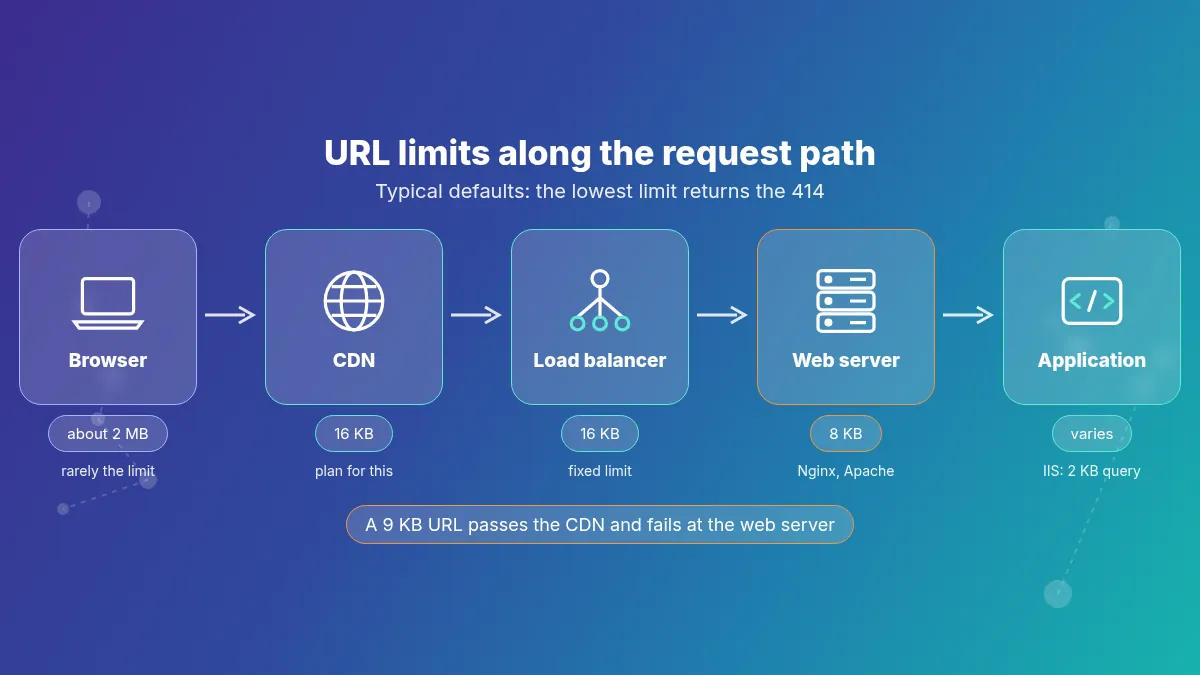
A request usually passes through several pieces of software before it reaches WordPress or your app, and each one can return the 414 before the next one sees the request. The lowest limit along the path is the one that counts. These are the defaults you are most likely to meet:
| Layer | Default limit | What happens above it |
|---|---|---|
| Nginx | Request line must fit in one large_client_header_buffers buffer: 8 KB by default | 414 Request-URI Too Large |
| Apache | LimitRequestLine 8,190 bytes | 414 Request-URI Too Long |
| IIS | Request filtering: maxUrl 4,096 bytes, maxQueryString 2,048 bytes | 404.14 (URL) or 404.15 (query string) |
| AWS Application Load Balancer | Request line 16 KB, not adjustable | 414 URI too long |
| Cloudflare | Documented URL limit 16 KB; its 414 page mentions 32 KB | 414 from Cloudflare; plan for 16 KB |
| Node.js HTTP server | 16 KB for the request line and headers together (--max-http-header-size) | Usually 431, not 414 |
Browsers are rarely the bottleneck today. Chrome accepts URLs of up to 2 MB, and the often quoted 2,048-character figure comes from old Internet Explorer limits and from the sitemap protocol, which requires URLs under 2,048 characters. For links you share, put in emails or submit in sitemaps, that is still a sensible ceiling. For requests between your own systems, design for the 8 KB defaults unless you control every layer.
So a URL can work against the origin and fail through the CDN, and raising the Nginx limit does nothing if a load balancer in front of it stops at 16 KB.
Find What Is Making the URL Grow
Copy the full failing URL from the address bar, the browser’s Network panel (right-click the request, Copy, Copy URL) or your access log. Then answer three questions: how long is it, which part is long, and does it get longer every time?
Measure the Length
URL='https://example.com/shop/?filter_color=red,blue&utm_source=mail'
printf '%s' "$URL" | wc -c
This counts bytes as sent, so percent-encoded characters are counted in full. Compare the result with the limits above. A URL of a few hundred bytes that still returns 414 means the limit is unusually low somewhere, or the error is coming from a different, longer request than the one you copied.
Count Repeated Parameters
python3 -c 'import sys, collections, urllib.parse as u
q = u.urlsplit(sys.argv[1]).query
print(len(q), "bytes in query")
print(collections.Counter(k for k, _ in u.parse_qsl(q)).most_common(8))' "$URL"
If utm_source, gclid, fbclid, lang or a filter name appears many times, something adds it again on every page view or redirect. If one parameter holds most of the bytes, check what it stores: a serialized object, a list of IDs, a base64 blob or a nested URL.
Watch the Redirect Hops
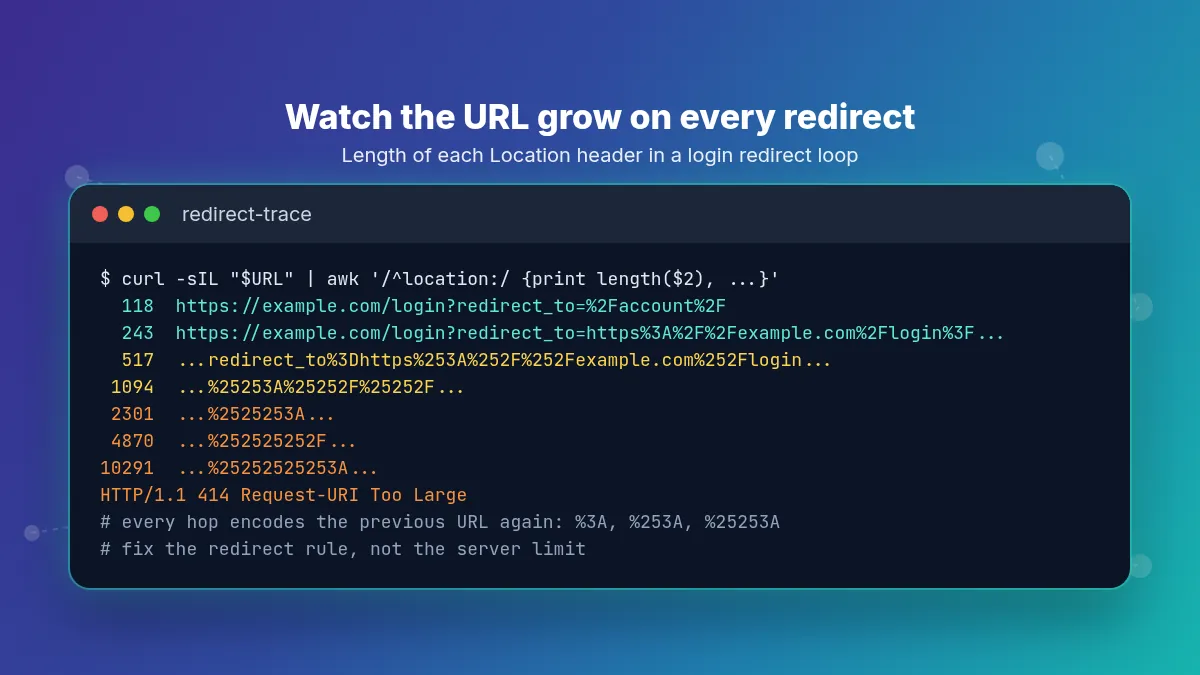
A URL that grows by itself is almost always a redirect loop that wraps the current URL into a parameter such as redirect_to, return, next or continue. Print the length of each Location header:
curl -sIL --max-redirs 15 "$URL" | awk 'tolower($1)=="location:" {sub(/\r$/, "", $2); print length($2), substr($2,1,90)}'Steady growth on every line means a loop. Look for the encoding snowball: every pass percent-encodes the previous URL again, so %3A becomes %253A, then %25253A. The nested URL roughly doubles in a few hops and hits 8 KB long before a browser gives up with ERR_TOO_MANY_REDIRECTS. That is why some loops end in a 414 instead of the usual redirect error.
Find It in the Logs
# requests that got a 414 (combined log format: status is field 9)
awk '$9 == 414' /var/log/nginx/access.log | tail -n 20

# longest request targets seen recently
awk '{print length($7), $7}' /var/log/nginx/access.log | sort -rn | head -n 5
A rejected request may be logged cut off, so match on client IP and time. If the server log has no 414 at all, a layer in front of it answered.
Find Which Layer Returns the 414
The error page and the response headers usually tell you who answered:
- A plain page titled 414 Request-URI Too Large with
nginxat the bottom is Nginx. Behind a CDN this can still be your origin. - Request-URI Too Long … exceeds the capacity limit for this server is Apache.
- A Cloudflare-branded page, or a response with
server: cloudflareand acf-rayheader but no headers your origin normally sends, means Cloudflare rejected it at the edge. - HTTP Error 404.14 – URL too long or 404.15 – Query string too long is IIS request filtering. Despite the 404 code the page exists; this is not a normal 404.
- A JSON error in your framework’s format means the request reached the application.
To find the exact threshold, send requests of increasing length and note where the status changes:
for n in 1000 2000 4000 7000 8500 12000 17000 33000; do
  q=$(head -c "$n" /dev/zero | tr '\0' a)
  printf '%6s ' "$n"
  curl -s -o /dev/null -w '%{http_code}\n' "https://example.com/?x=$q"
done
A jump from 200 to 414 near 8,000 points at a server default; a jump at 16 KB or 32 KB points at a load balancer or CDN. A 000 means the connection was closed without any HTTP response, which some CDNs do for very long requests. Repeat it against the origin directly (--resolve example.com:443:ORIGIN_IP) to see whether origin and edge disagree. Run it only against your own site.
How to Fix 414 Request-URI Too Long Step by Step
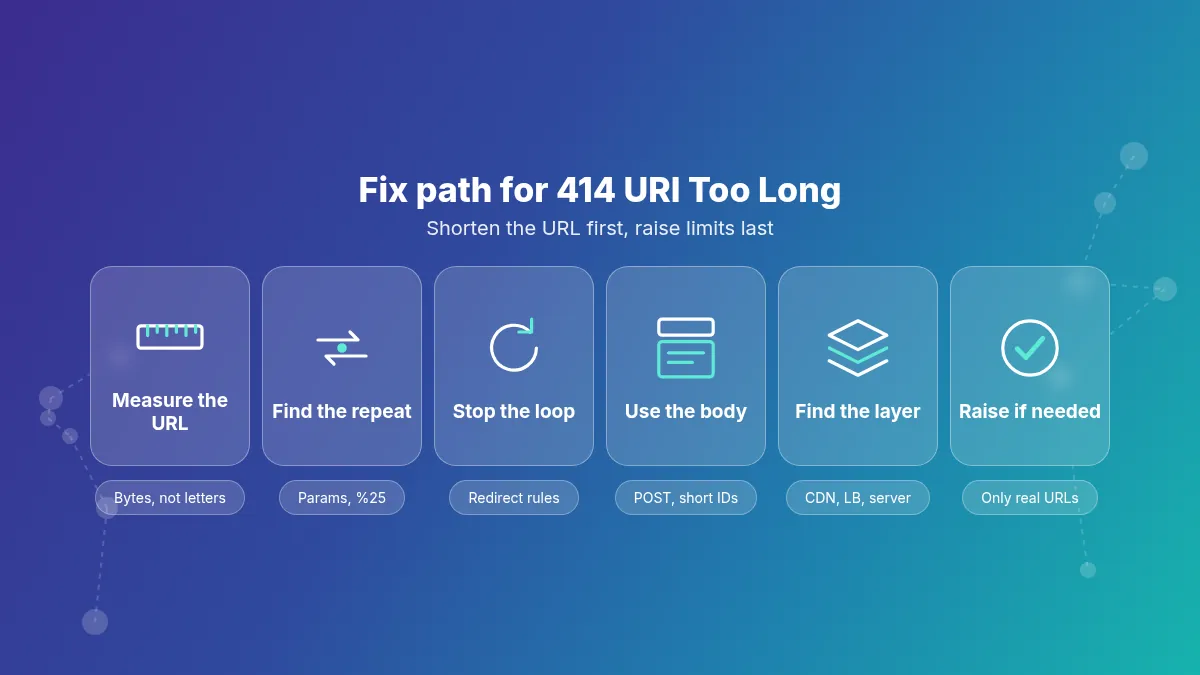
1. Stop Redirect Loops That Wrap the URL
If the trace shows growth, fix the rule, not the limit. Common loops are an HTTP-to-HTTPS rule fighting a CDN or proxy that already terminates HTTPS, www and non-www rules in two places, a login or SSO page that sends unauthenticated users back to itself with the current URL attached, and language redirects that add ?lang= each time. A rule should only append a return URL when the current URL is not already the login or redirect page. The site-specific causes are covered in too many redirects after SSL and the WordPress login redirect loop.
2. Remove Duplicate and Unneeded Parameters
Strip tracking parameters once, at the first redirect, instead of passing them along on every hop. Check links that combine manual UTM tags with automatic ones such as gclid, affiliate links wrapped by several redirect services, and session IDs in URLs (keep sessions in cookies). If an email tool rewrites links, test the final URL it produces.
3. Move Data Out of the Query String
Forms and API calls that send many fields or long lists should use POST, with the data in the request body. For search results that people need to bookmark, use the Post/Redirect/Get pattern: accept the long query with POST, store it, and redirect to a short GET URL such as /search/?saved=7f3a. Other options:
- Store complex filter state on the server or in local storage and put a short ID in the URL.
- Use shorter parameter names and comma-separated values instead of repeating
id[]=for every item. - Keep purely client-side state in the fragment (the part after
#). Browsers do not send the fragment to the server, so it never counts toward a server limit. - For single sign-on, switch SAML from the HTTP-Redirect binding, which puts the encoded request in the URL, to the HTTP-POST binding.
A switch from GET to POST has side effects: POST responses are not cached by default, the back button shows a resubmit warning, and the server route must accept the method (otherwise you get 405 Method Not Allowed). The new HTTP QUERY method, published as RFC 10008 in June 2026, is designed for exactly this case: a safe, cacheable request with the query in the body. Support in servers, proxies and client libraries is still arriving, so check every layer before relying on it.
4. Paginate Bulk Requests
Exports, bulk edits and dashboards that request hundreds of records by ID should send them in batches or by a filter (date range, status, category) instead of listing every ID. The same applies to headless sites that call the REST API with long include lists; if the calls fail in other ways, see WordPress REST API errors.
5. Align the Limits Along the Path
If the long URL is legitimate, raise the limit on the layer that rejected it, then check that every layer behind it accepts the same length. A CDN that passes 16 KB to an origin that stops at 8 KB just moves the error.
6. Retest the Real Flows
Repeat the failing action (campaign link, filter combination, deep-link login, bulk action) and run the length loop again.
WordPress Causes of 414
Bulk Actions on Hundreds of Items
The Posts, Pages, Comments and Users screens submit bulk actions through a GET form, and every selected row adds a parameter such as post%5B%5D=12345. With Screen Options set to show several hundred items per page, Select All plus a bulk action can produce a URL well over 8 KB. Lower the number of items per page, run the action in batches, or use WP-CLI for large jobs, for example:
wp post delete $(wp post list --post_type=post --post_status=trash --format=ids)Login and Redirect Loops
A loop between wp-login.php and a protected page adds a fresh redirect_to on every pass, which is the encoding snowball described above. Typical triggers are a wrong siteurl or home value, HTTPS detection behind a proxy, cookie domain changes and security or membership plugins that force their own login page. Fix the loop and the 414 goes with it.
Filter, Search and Multilingual Plugins
Faceted filter plugins and WooCommerce layered navigation encode every selected attribute in the URL. A shopper who ticks many options, or a bot that crawls every combination, can push the URL to the limit. Limit how many filters can be combined, use AJAX filtering that keeps the URL short, and keep filter URLs out of the crawl with noindex or robots rules; aggressive crawlers can also be slowed down with rate limits (see 429 Too Many Requests). Multilingual and redirect plugins that both add language or tracking parameters on redirect can append them repeatedly; test with one of them disabled on a staging copy.
Slugs and searches in non-Latin scripts add to the length because every letter is percent-encoded: a 150-character Ukrainian title can become a slug of about 900 bytes. Keep slugs short or transliterate them.
Raising the Limit Safely
Raise a limit only when you know which URLs need it. Large request buffers use memory per connection, so set the smallest value that fits your longest legitimate URL with some headroom.
Nginx
# /etc/nginx/nginx.conf, inside http { }
large_client_header_buffers 4 16k;
Run sudo nginx -t && sudo systemctl reload nginx. Set it in the http block or in the default server: the request line is read before Nginx knows which virtual host the request is for, so a value set only in a non-default server block may not be used. One request line must fit into one buffer, so four 8 KB buffers do not give you a 32 KB URL. If Nginx proxies to another server, raise the limit there too.
Apache
# apache2.conf / httpd.conf (main server config)
LimitRequestLine 16380
Check with sudo apachectl configtest and reload Apache. Put it in the main configuration or the first (default) virtual host for that address, because Apache reads the request line before it picks the name-based virtual host. LimitRequestFieldSize controls single header lines, which is a 431 or 400 problem, not a 414.
IIS and ASP.NET
<system.webServer>
  <security>
    <requestFiltering>
      <requestLimits maxUrl="8192" maxQueryString="8192" />
    </requestFiltering>
  </security>
</system.webServer>
ASP.NET applications also check maxUrlLength and maxQueryStringLength on the httpRuntime element, so long URLs can pass IIS and still fail in the application.
Node.js, Load Balancers and CDNs
Node.js reads the request line and headers against one limit; start the process with --max-http-header-size=32768 if long URLs are expected. The AWS Application Load Balancer limit cannot be raised, and Cloudflare’s URL limit is fixed per plan, so a URL above roughly 16 KB has to be shortened. A WAF can also block long query strings with its own rule and answer 403 or 400 instead of 414; if that happens, look in the WAF events rather than the server config (see 403 Forbidden on WordPress).
Prevention Tips
- Treat URLs as addresses, not storage. Anything that can grow without limit belongs in the request body, the session or the database.
- Add a test to your deployment checks that follows the main redirects and fails if a
Locationheader grows between hops. - Strip or normalize tracking parameters at the first redirect and never add them twice.
- Cap the number of combinable filters and keep filter URLs out of search engine crawls.
- Alert on 414 responses in the access log or CDN analytics; a sudden rise usually means a new loop or a bot crawling filter combinations.
For other client errors that show up after configuration changes, how to fix website errors lists the related guides.
When to Contact Support
As a visitor, contact the site owner if the page fails even when you open it from the homepage, or if a search or filter always returns 414; there is nothing more you can fix on your side. As a site owner, contact your host if the threshold test shows a limit below the defaults or the 414 comes from a proxy you cannot configure, and your CDN provider if the edge rejects URLs well under its documented limit. Hand it to your developers when the URL contains serialized data or the problem started after a release. Send the failing URL, its length in bytes, the response headers and the time of the request.
Frequently Asked Questions
The server refused the request because the URL, mostly the query string, is longer than its limit. RFC 9110 calls it 414 URI Too Long. Most servers allow about 8 KB by default.
There is no single maximum. Nginx and Apache allow about 8 KB by default, IIS 4 KB for the URL and 2 KB for the query string, and AWS load balancers 16 KB. The lowest limit on the request path wins.
A redirect loop is wrapping the current URL in a parameter such as redirect_to on every hop. Each pass encodes it again, so the URL roughly doubles until a server rejects it. Fix the redirect rule.
Check login and redirect loops, redirect, multilingual and filter plugins, and bulk actions on hundreds of selected items. Lower the items per page or use WP-CLI for large bulk jobs.
Only when the long URL is intended. If it comes from a loop, duplicated parameters or data that belongs in a request body, a higher limit hides the bug. Raise it on the layer that rejects the request.
A 414 means the URL is too long. A 431 means the request headers are too large, usually because of cookies. A 413 means the request body, such as an upload, is too large.

Hi, I’m Alex — the person behind ErrorRescue.
I’ve been working with websites, servers, and hosting for over 8 years. Most of my experience comes from troubleshooting real problems on WordPress sites, VPS and shared hosting environments, and Cloudflare setups. I’ve dealt with everything from SSL certificate failures and DNS misconfigurations to 504 timeouts, memory exhaustion errors, and Cloudflare 5xx issues.
I started ErrorRescue because I got tired of seeing generic, outdated, or incomplete error guides. My goal is to write clear, practical fixes based on what actually works in production — not just theory. Every guide here is tested against common server setups (Apache, NGINX, Cloudflare, and popular WordPress stacks).
When I’m not fixing sites, I’m usually reviewing new hosting configurations or updating existing guides so they stay accurate.