
Last tested: November 20, 2026 · By Alex
WordPress not sending emails is really one of three problems: the plugin that should send the email never asks WordPress to send it, WordPress cannot hand the message to a mail server, or the message is handed off but the receiving server rejects it or files it as spam. Each one has different fixes, so the first job is to find out where your email stops.
This guide walks through that in order: a test that shows whether WordPress can send at all, a log that captures the exact error, the SMTP and hosting problems that block sending, the header check that shows why delivered mail lands in spam, and the plugin settings behind cases where only contact forms or WooCommerce emails fail. Most sites end up with the same setup: one SMTP plugin, a real mailbox or transactional service, a From address on the site’s own domain, and valid SPF, DKIM and DMARC records.
Quick Checks
- Trigger a password reset for your own account. Note whether WordPress reports an error or says the email was sent.
- Check spam, junk and quarantine folders, and test with a second mailbox provider, for example one Gmail and one Outlook address.
- Look at Settings → General → Administration Email Address. A changed admin address is not used until you click the link in the confirmation email.
- Check whether every email fails or only one type, such as contact forms or WooCommerce orders.
- Make sure only one SMTP or mail plugin is active.
- If you send through Microsoft 365 with a password, note that Microsoft disables basic authentication for SMTP by default in existing tenants from the end of December 2026 (details below).
Sent, Handed Off or Delivered? Find Where Mail Stops
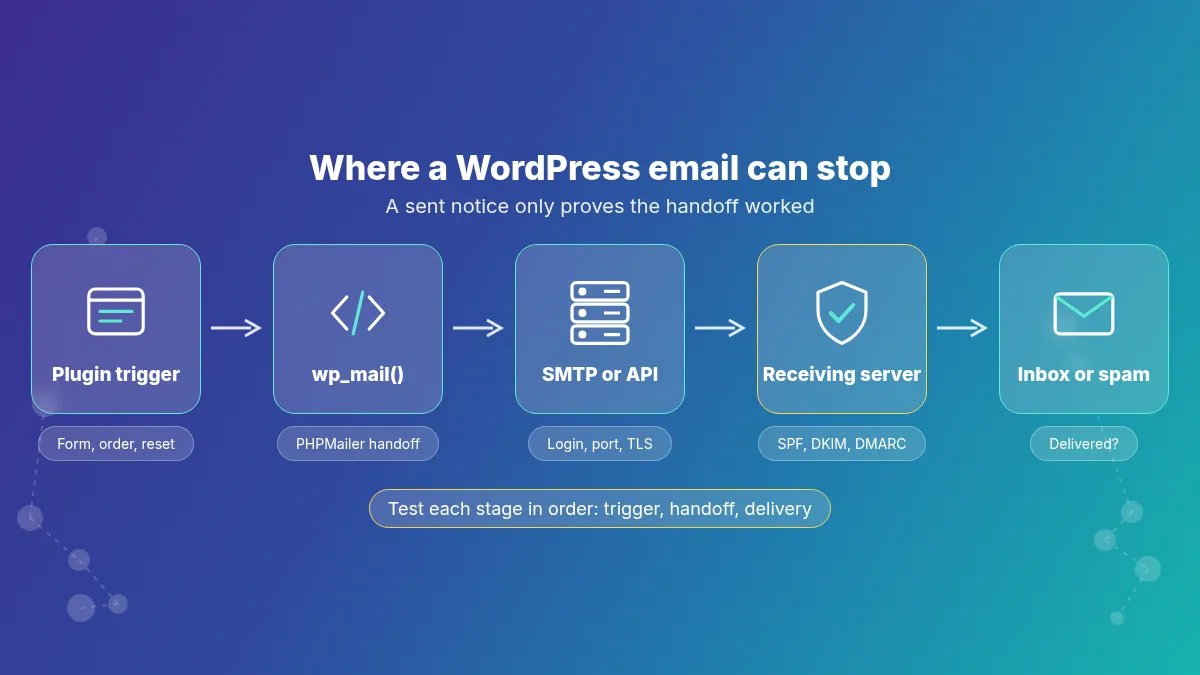
Every email from WordPress goes through the same path. A core feature or plugin builds the message and calls wp_mail(). WordPress passes it to the bundled PHPMailer library, which either uses the server’s PHP mail() function or, when an SMTP plugin is active, connects to a mail server or sending API. That server then delivers it to the recipient’s provider, which checks authentication and reputation before choosing the inbox, the spam folder or a rejection.
A “message sent” notice only means the second step worked. wp_mail() returns true once PHPMailer has handed the message off; it knows nothing about what happens at the receiving end.
| What you see | Where it stops | Where to look |
|---|---|---|
| The email never appears in any mail log | Trigger: the plugin never called wp_mail() | The plugin’s notification settings |
| Error such as “Could not instantiate mail function” or “Could not authenticate” | Handoff: PHP mail or SMTP failed | SMTP plugin debug output, failure log |
| Marked sent in WordPress and the provider log, nothing in the inbox | Delivery: filtered or rejected | Spam folder, bounce messages, email headers |
| Arrives hours late | Trigger or provider queue | WP-Cron, provider rate limits |
Test Whether WordPress Can Send at All
Send a test email
Most SMTP plugins have a test tab that sends one message and shows the full conversation with the mail server. Without a plugin, a password reset or a new user notification is a good test, because it comes from WordPress core and does not depend on form or shop settings.
Test from WP-CLI
If you have SSH access, this sends a message through the same wp_mail() function and prints the result:
wp eval 'var_dump( wp_mail( "you@example.com", "WP mail test", "Sent from WP-CLI" ) );'bool(false) means WordPress could not hand the message off; read the failure log below. bool(true) with no email in the inbox moves the problem to delivery.
Log every failure
WordPress fires the wp_mail_failed action with the PHPMailer error whenever a send fails. A small must-use plugin writes it to the PHP error log, or to wp-content/debug.log when WP_DEBUG_LOG is on:
<?php
// wp-content/mu-plugins/log-mail-failures.php
add_action( 'wp_mail_failed', function ( $error ) {
    error_log( 'wp_mail_failed: ' . $error->get_error_message() );
} );
A mail logging plugin does the same job with a dashboard and also records successful sends, which is useful for proving whether a specific contact form or order email was ever sent. Remove debug logging when you finish, as described in the White Screen of Death guide.
Test the mail account outside WordPress
Send a message from the same mailbox with webmail or a desktop mail client using the same SMTP details. If that fails too, the account, password or provider is the problem, not WordPress.
When WordPress Cannot Send: Causes and Fixes
1. PHP mail() is disabled or unreliable
Without an SMTP plugin, WordPress uses PHP mail(), which hands the message to the server’s local mail program. Many hosts disable it, cap it at a few messages per hour, or send from a shared IP address with poor reputation. “Could not instantiate mail function” in the log means PHP mail is not available.
Fix: send through authenticated SMTP or a sending API instead. Install one SMTP plugin, such as WP Mail SMTP, FluentSMTP or Post SMTP, and connect it to your mailbox provider or a transactional email service. You need the host, the port and encryption type, the full username, a password, app password or API key, and a From address on your domain.
2. SMTP settings or credentials are wrong
A wrong hostname, port, encryption type or password breaks every send. Typical messages: SMTP Error: Could not authenticate or 535 Authentication failed for credentials, and Could not connect to SMTP host or a timeout for host and port problems.
Fix: copy the host and port from the provider’s documentation and match the encryption to the port: port 587 with STARTTLS (often labelled TLS in plugins) or port 465 with implicit TLS (often labelled SSL). Mixing them, such as SSL on 587, fails. Use the full email address as the username and save, then send another test.
3. The provider no longer accepts a plain password
Big mailbox providers are moving SMTP away from the normal account password. Google accounts need an app password, which requires 2-Step Verification, or an OAuth connection that many SMTP plugins offer. For Microsoft 365, Microsoft’s current timeline disables basic authentication for SMTP AUTH by default in existing tenants at the end of December 2026; administrators can turn it back on for now, new tenants created after that do not get it by default, and Microsoft plans to announce a final removal date in the second half of 2027. A site that sends through smtp.office365.com with a password can stop sending overnight with a 535 or 550 5.7.x authentication error.
Fix: switch the plugin to its OAuth or API connection for Google or Microsoft, or send through a transactional email service with an API key. Re-enabling basic authentication buys time but is not a long-term fix.
4. The host blocks outgoing SMTP ports
Many cloud and shared hosts block or throttle outgoing port 25, and some also block 465 and 587. Google Cloud blocks outbound connections to port 25 on external addresses, and Amazon EC2 restricts port 25 by default until you request removal.
How to check: run this from the server, then from your own computer:
nc -vz smtp.example.com 587
nc -vz smtp.example.com 465
openssl s_client -starttls smtp -connect smtp.example.com:587
A timeout on the server while the same command works from your computer means the host blocks the port. If nc reports the connection as open and openssl prints the mail server’s certificate and then waits for input, the port is open and STARTTLS works; type QUIT to leave.
Fix: use port 587 or 465 if one of them is open, switch the plugin to an API-based mailer that sends over HTTPS on port 443, or ask the host for its relay settings.
5. TLS or certificate errors on the SMTP connection
Errors such as SMTP connect() failed after a successful connection, or certificate verify failed, usually mean an outdated CA bundle on the server, a hostname that does not match the mail server’s certificate, or a host that intercepts outgoing SMTP. Use the exact hostname from the provider rather than an IP address, update the server’s CA certificates and PHP, and see SSL handshake failed for the TLS side. Do not turn off certificate verification in the plugin to make the error go away.
6. Two mail plugins or custom code override each other
Two SMTP plugins, a form plugin with its own mailer, a security plugin that blocks outgoing connections, or theme code hooked into phpmailer_init, pre_wp_mail or wp_mail_from can all break mail. List active plugins with wp plugin list --status=active, keep a single mail plugin, and search the theme and custom plugins for those hooks. If an SMTP plugin itself crashes the site, WordPress cannot send its own critical error recovery email either.
Read the Headers of a Test Email
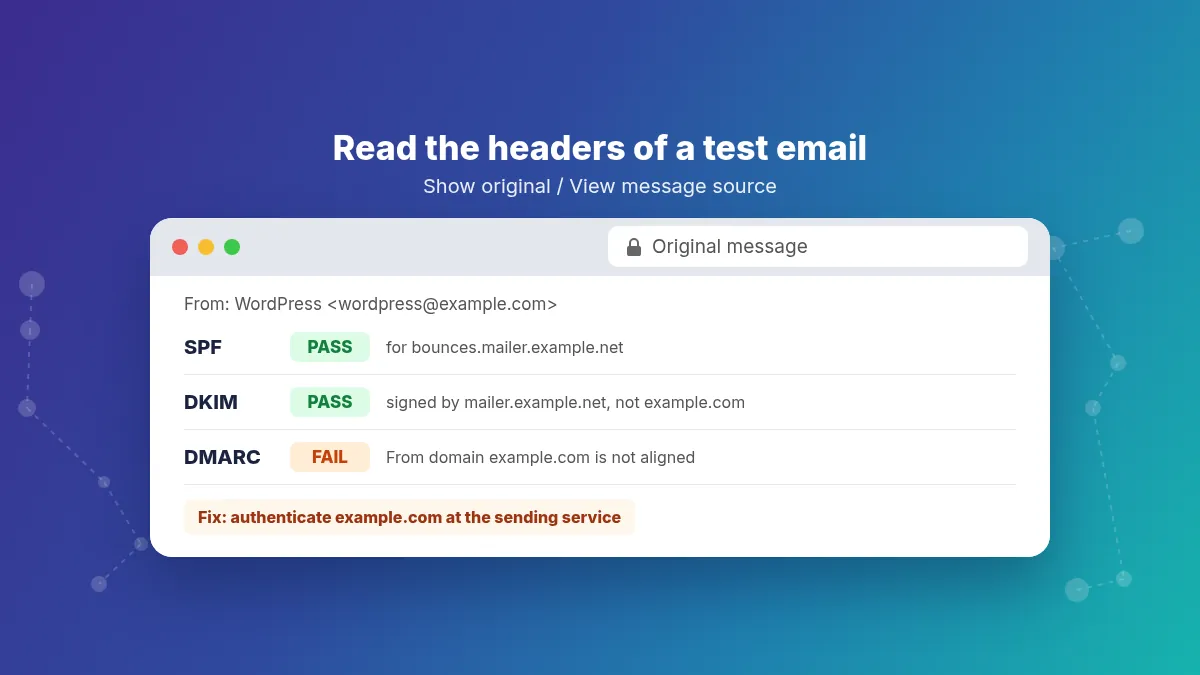
When WordPress and the SMTP provider both say the message was sent, the headers of a delivered copy show why it went to spam or why other copies were rejected. In Gmail, open the message, click the three-dot menu and choose Show original; in Outlook, open View message source. Look at the Authentication-Results header:
Authentication-Results: mx.google.com;
       dkim=pass header.i=@mailer.example.net;
       spf=pass smtp.mailfrom=bounces.mailer.example.net;
       dmarc=fail (p=NONE) header.from=example.com
In this example SPF and DKIM pass, but for the sending service’s domain rather than example.com, so DMARC fails: neither result is aligned with the From domain. The fix is domain authentication at the sending service (the DKIM and return-path records it asks you to publish), not another plugin. Also note spf=softfail, dkim=none or dmarc=none, which mean a record is missing or does not cover the server that sent the message.
When Mail Sends but Never Arrives: Causes and Fixes
1. The From address does not match the sending domain
By default WordPress sends from wordpress@ plus your site’s domain with the name “WordPress”. That mailbox often does not exist, and plugins can override it with a Gmail or other free address that your server is not allowed to send for. Receiving servers treat both as suspicious.
Fix: set a real address on your domain, such as support@example.com, in the SMTP plugin and enable its force From option so other plugins cannot change it. Put a visitor’s address from a contact form in Reply-To, never in From.
2. SPF is missing, duplicated or too long
Check your records from any terminal:
dig +short TXT example.com | grep spf1
dig +short TXT _dmarc.example.com
dig +short TXT selector._domainkey.example.com
Replace selector with the DKIM selector your provider gives you. A domain must have exactly one SPF record. Two v=spf1 records make SPF fail with a permanent error, and an SPF record that needs more than 10 DNS lookups through nested include: entries fails the same way. Merge everything into one record that includes each service that sends for the domain, for example v=spf1 include:_spf.google.com include:spf.mailer.example.net ~all, using the include values from each provider.
3. DKIM is not set up for your domain
Your mailbox provider or sending service generates DKIM keys and gives you one or more DNS records to publish. Until they are published and signing is enabled in its dashboard, messages are either unsigned or signed with the provider’s own domain, which does not help DMARC. Gmail requires DKIM keys of at least 1024 bits and recommends 2048.
4. No DMARC record
Publish a DMARC record such as v=DMARC1; p=none; rua=mailto:dmarc@example.com at _dmarc.example.com, read the reports for a few weeks, and tighten the policy to quarantine or reject only when every legitimate sender passes. New TXT records can take a while to appear everywhere; see how long DNS propagation takes.
5. The receiving provider’s sender rules
Since February 2024 Gmail requires all senders to authenticate with SPF or DKIM, send over TLS, have valid forward and reverse DNS for the sending IP and keep spam complaints low. Senders of 5,000 or more messages a day to Gmail must have SPF, DKIM and DMARC, alignment with the From domain and one-click unsubscribe on marketing mail. Yahoo and Microsoft’s Outlook.com apply similar rules to high-volume senders. A WordPress site sending from its own VPS IP without reverse DNS, or from a shared host IP on a blocklist, often fails these checks even with correct DNS, which is one more reason to send through an established provider.
6. DNS records were lost in a migration
Moving DNS to a new provider or to a CDN often drops TXT and MX records that only existed at the old one. If email stopped right after a nameserver change, compare the old and new zones as described in website not working after a DNS change.
When Only Some Emails Fail
If a password reset arrives but a contact form or order email does not, WordPress mail works and the plugin that triggers that email is the problem. Check the mail log: an email that never appears there was never sent.
- Contact forms: check the form’s notification or mail tab. The recipient must be correct, the From field should use your domain, and the visitor’s address belongs in Reply-To. Spam protection that silently discards submissions can look like a mail problem.
- WooCommerce: open WooCommerce → Settings → Emails, make sure each notification is enabled and has the right recipient, and check whether order status changes actually happen, since many emails fire only on a status change.
- Password reset links that fail: if the email arrives but the link loops back to the login page, the problem is cookies or redirects, covered in WordPress login redirect loop.
- Scheduled and digest emails: they depend on WP-Cron, which runs only when someone visits the site unless a real cron job calls it. Late or missing scheduled emails usually share a cause with WordPress missed schedule.
- Emails sent by the block editor or REST requests, such as notifications on publish, fail together with the request when the REST API is blocked; see WordPress REST API error.
How to Fix WordPress Not Sending Emails Step by Step
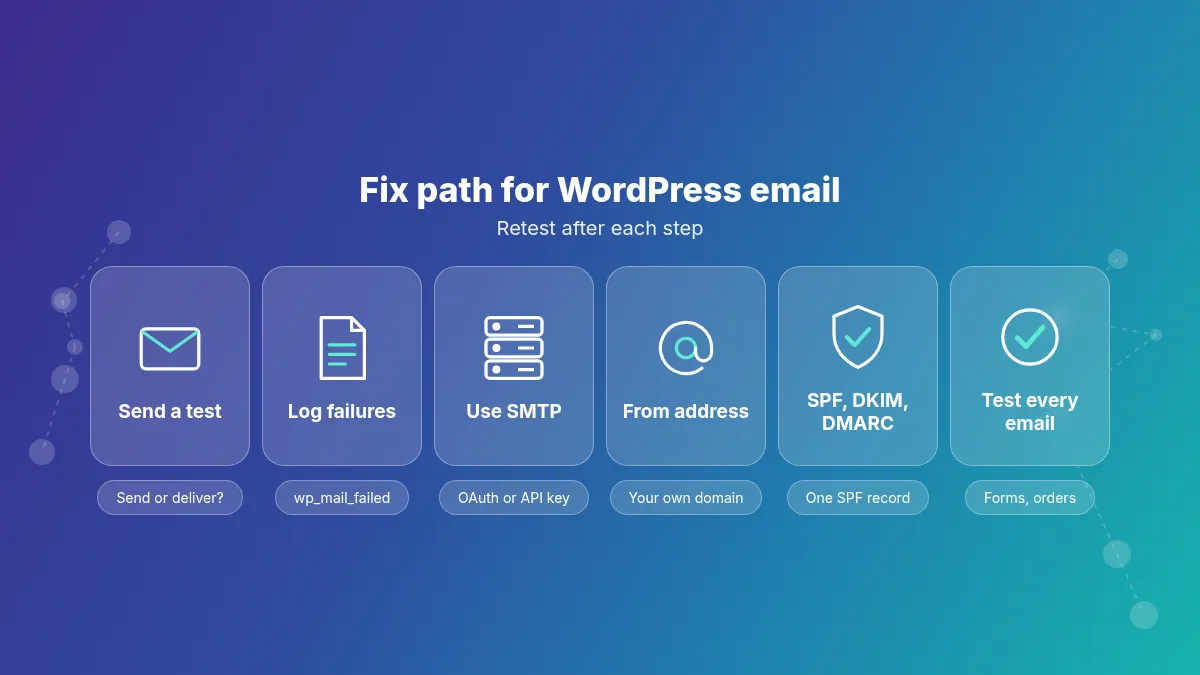
If you want one order that fixes most sites, follow these steps and retest after each one:
- Send a test (password reset, plugin test or WP-CLI) and decide whether the problem is sending or delivery.
- Log failures with the
wp_mail_failedsnippet or a mail log plugin so you see the exact error. - Switch to authenticated SMTP or an API mailer in one plugin, using OAuth, an app password or an API key where the provider requires it.
- Use a From address on your own domain and force it in the plugin.
- Publish one SPF record, DKIM and DMARC for the service that sends, then check
Authentication-Resultson a new test message. - Test every email type the site sends: password reset, contact forms, orders and scheduled emails.
If a step produces a fatal error, for example after activating an SMTP plugin on an old PHP version, use the 500 internal server error guide or rename the plugin folder over FTP. A plugin that fails to load because of a missing file shows failed to open stream in the log. If an update of the mail plugin was interrupted, see WordPress stuck in maintenance mode.
Prevention Tips
- Use authenticated SMTP or an API mailer on every production site; do not rely on PHP
mail(). - Keep one mail plugin, and remove abandoned ones instead of only deactivating them.
- Document SPF, DKIM and DMARC records and the services they cover, so a DNS migration does not drop them.
- Watch provider announcements about authentication changes, such as Microsoft’s SMTP basic authentication timeline, and move to OAuth or API keys early.
- Test a password reset and a contact form after every plugin, host or DNS change.
- Keep the mail log turned on for stores and membership sites, with a retention limit.
For other WordPress and website errors, start from how to fix website errors.
When to Contact Support
Contact your host if outgoing SMTP ports are blocked, PHP mail() is disabled without explanation, or mail stopped after a server move. Contact your mailbox or sending provider if authentication fails with correct credentials, messages bounce with 5xx codes, or the provider’s log shows rejections. Send the exact error from the failure log, the time of the test, the From and To addresses and, for delivery problems, the full headers of a test message.
Frequently Asked Questions
Usually because the server blocks or limits PHP mail, the SMTP settings or password are wrong, the host blocks SMTP ports, or the message is sent but rejected or filtered because the From domain lacks SPF, DKIM and DMARC.
Trigger a password reset, use the test tab of your SMTP plugin, or run wp eval with wp_mail in WP-CLI. A false result or an error means WordPress cannot hand off the message; true with no email means a delivery problem.
For a production site, yes. Authenticated SMTP or a sending API through one plugin is far more reliable than PHP mail, gives you a log and lets you send from an address on your own domain.
Most often the From address does not match an authenticated domain, SPF or DKIM is missing, or DMARC fails because neither result is aligned. Check the Authentication-Results header of a delivered test message.
Microsoft is retiring basic authentication for SMTP AUTH. From the end of December 2026 it is disabled by default in existing tenants. Switch the SMTP plugin to OAuth or use an API based sending service.
WordPress mail works, so check the form plugin: the recipient, a From address on your domain and the visitor address in Reply-To. If the email never appears in the mail log, the form never sent it.

Hi, I’m Alex — the person behind ErrorRescue.
I’ve been working with websites, servers, and hosting for over 8 years. Most of my experience comes from troubleshooting real problems on WordPress sites, VPS and shared hosting environments, and Cloudflare setups. I’ve dealt with everything from SSL certificate failures and DNS misconfigurations to 504 timeouts, memory exhaustion errors, and Cloudflare 5xx issues.
I started ErrorRescue because I got tired of seeing generic, outdated, or incomplete error guides. My goal is to write clear, practical fixes based on what actually works in production — not just theory. Every guide here is tested against common server setups (Apache, NGINX, Cloudflare, and popular WordPress stacks).
When I’m not fixing sites, I’m usually reviewing new hosting configurations or updating existing guides so they stay accurate.